You open a contract that was signed two years ago. Nobody has touched the file since. Yet Adobe Acrobat now shows a yellow warning: “Signature validity is UNKNOWN”, or worse, “At least one signature has problems”.
Nothing is wrong with the document. What changed is time. The certificate used to sign it has expired, and the PDF contains no trusted proof of when it was signed. Without that proof, a perfectly valid signature can no longer be trusted.
For one contract, this is an annoyance. For an organisation that signs thousands of invoices, policies, statements or contracts every month, it is a growing liability hidden in the archive. This article explains why it happens, and how to make sure your signed documents stay valid for as long as you need to keep them.
Why a valid signature “breaks” after a few years
A digital signature is only as trustworthy as the certificate behind it. And certificates are designed to expire. Signing certificates are typically valid for one to three years, and they can also be revoked before that date.
When Acrobat (or any other validator) checks a signature, it asks a simple question: was the signing certificate valid at the moment the document was signed?
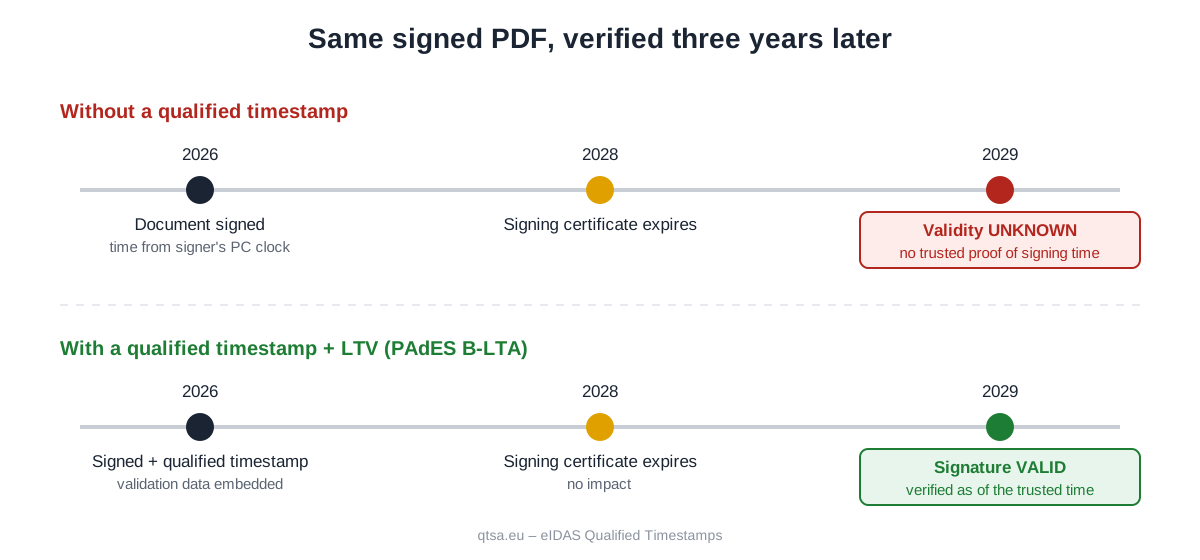
To answer, it needs to know that moment. And here is the problem. In a PDF signed without a trusted timestamp, the signing time comes from the clock of the computer or server that created the signature. Acrobat even says so in the signature details: “Signing time is from the clock on the signer’s computer.” Anyone can change that clock, so the validator cannot rely on it.
With no trustworthy signing time, the validator has only one safe option: check the certificate against the current date. Once the certificate has expired, the result is “validity unknown” or “invalid”, even though the signature was perfectly correct on the day it was made.
There is a second, quieter problem. To confirm that a certificate was not revoked, the validator contacts the certificate authority online (through OCSP or CRL). Years later, those services may have changed, or the authority may no longer exist. If the revocation information was not saved inside the PDF at signing time, it may simply be impossible to obtain.
What a qualified timestamp actually proves
A timestamp is a small, signed statement issued by an independent Timestamping Authority (TSA). It says: “This exact data existed at this exact moment.” Technically, your system sends only a hash (a digital fingerprint) of the document to the TSA, using the RFC 3161 protocol. The document itself never leaves your infrastructure.
When the timestamp is embedded in the PDF signature, the validator no longer has to trust the signer’s clock. It can check the certificate as of the trusted time, and an expired certificate becomes irrelevant, because it was valid when the timestamp was issued.
A qualified timestamp also adds legal weight. Under the EU eIDAS Regulation (EU) No 910/2014, a qualified electronic timestamp, issued by a Qualified Trust Service Provider listed in the EU Trusted Lists, enjoys a legal presumption of the accuracy of the date and time it indicates and of the integrity of the data (Article 41(2)). It is also recognised as qualified in every EU Member State (Article 41(3)). If the date of a document is ever challenged, the burden of proof is on whoever disputes it, not on you.
For contracts, invoices or records that may end up in front of an auditor or a court, that presumption is what makes the date of a signed document hard to dispute.
A timestamp alone is not enough: Long-Term Validation (LTV)
The timestamp fixes the “when”. To keep the signature verifiable for many years, the PDF also needs to carry its own evidence, so that it does not depend on online services that may disappear. This is what Long-Term Validation (LTV) means.
The European PAdES standard (ETSI EN 319 142) defines four levels of signature, each adding protection to the previous one:
| Level | What it contains | What happens after the certificate expires |
|---|---|---|
| PAdES B-B | Signature only | Validity unknown. No trusted signing time. |
| PAdES B-T | Signature + qualified timestamp | Valid, as long as revocation data can still be obtained online. |
| PAdES B-LT | B-T + certificates and revocation data embedded in the PDF | Valid and verifiable offline. Acrobat shows “LTV enabled”. |
| PAdES B-LTA | B-LT + a document timestamp protecting all the evidence | Valid for the long term, and can be extended indefinitely by adding new timestamps. |
For any document you are legally required to keep for five, ten or more years, PAdES B-LTA is the level to aim for. It protects the signature, the timestamp and the validation data together. Before the timestamping certificate itself expires, or before the cryptographic algorithms age, a new archive timestamp is added and the protection is renewed.
Can you fix a PDF that already shows “validity unknown”?
Only partly, and this is the most important point of this article.
You can add a timestamp to an old document today. But that timestamp proves only that the document existed today. It cannot prove that the signature was made two years ago, when the certificate was still valid. That evidence had to be created at the moment of signing, and it cannot be recreated afterwards.
In other words, the time to protect a signature is when it is created. Every document signed without a qualified timestamp is a document whose validity will quietly expire with its certificate.
The real risk: not one PDF, but your whole archive
The people who discover this problem usually find it on a single file. But the organisations most exposed are those that sign documents automatically and in large numbers:
- E-invoicing platforms and ERP systems that sign and archive every invoice they issue;
- Banks and insurers issuing signed statements, policies and contracts to thousands of customers;
- HR and payroll systems generating signed payslips, contracts and certificates;
- Healthcare providers and laboratories signing medical reports and results;
- Public institutions issuing signed certificates, permits and decisions;
- Document management and archiving solutions that must preserve evidential value for decades.
In these workflows, nobody opens each PDF in Acrobat to check it. The problem stays invisible until an audit, a dispute or an inspection, often years later, when hundreds of thousands of documents may already be affected and the original signing time can no longer be proven.
How to build qualified timestamps into an automated workflow
The good news is that in an automated system, adding long-term validity is a one-time integration, not a manual task. A typical server-side flow looks like this:
- Sign the document on the server, with an electronic seal or signature stored in an HSM or a remote signing service, producing a PAdES signature.
- Request a qualified timestamp for the signature from the TSA over RFC 3161 and embed it (PAdES B-T). This takes milliseconds and only a hash is sent.
- Collect and embed the validation data: the certificate chain and the OCSP or CRL responses (PAdES B-LT).
- Add a document timestamp over the whole file, including the validation data (PAdES B-LTA).
- Archive the document and schedule a new archive timestamp before the timestamping certificate or the algorithms reach the end of their life.
All major signing libraries support this out of the box, including the European Commission’s DSS library, iText, Apache PDFBox and BouncyCastle. Using a qualified TSA is usually just a matter of configuring the TSA URL and your credentials. Our integration guides show how to do it step by step.
How many timestamps does a workflow need?
A PAdES B-LTA signature typically uses two timestamps per document: one for the signature and one document timestamp over the validation data. Archive timestamps are added later, when the protection needs to be renewed.
This makes the volume easy to estimate:
| Documents signed per month | Timestamps per month | Timestamps per year |
|---|---|---|
| 5.000 | 10.000 | 120.000 |
| 25.000 | 50.000 | 600.000 |
| 50.000 | 100.000 | 1.200.000 |
At these volumes, the cost per document is a fraction of a cent, far less than the cost of a single document whose validity cannot be proven when it matters. Our volume packages are designed for exactly these workflows, and every package can be used over 24 months.
Why qtsa.eu
- eIDAS qualified. Timestamps are issued by AlfaTrust Certification S.A., a Qualified Trust Service Provider listed in the EU Trusted Lists, with full legal value in every EU Member State.
- Recognised by Adobe automatically. Because our service is on the EU Trusted Lists, Adobe Acrobat and Reader validate our timestamps without any manual configuration on the reader’s side.
- Built for automation. A standard RFC 3161 endpoint that works with any signing library, designed for continuous, high-volume use.
- Privacy by design. Only the document hash is sent. Your documents never leave your systems.
- Simple volume pricing. Prepaid packages from a few thousand to over a million timestamps, valid for 24 months.
Test it on your own workflow
The best way to see the difference is to run it on your real documents. Request 50 free qualified timestamps, point your signing system to our TSA, and open the result in Adobe Acrobat. You will see the signature reported as valid, with a trusted timestamp and LTV enabled, exactly as it will appear years from now.
Get 50 free eIDAS qualified timestamps →
Frequently asked questions
Why does Acrobat say “Signing time is from the clock on the signer’s computer”?
Because the PDF does not contain a trusted timestamp. The only time available is the one recorded by the signer’s system, which can be changed and therefore cannot be relied on. Adding a qualified timestamp at signing time replaces it with a time certified by an independent authority.
My signing certificate has already expired. Can I still save my documents?
You can add a timestamp now, but it will prove only that the document existed from today onwards, not that it was signed while the certificate was valid. That is why timestamps must be added when the signature is created. The sooner your workflow includes them, the fewer documents remain exposed.
Why does the timestamp need to be qualified?
A qualified timestamp enjoys the legal presumption of accuracy that eIDAS grants under Article 41(2), is recognised in every EU Member State and is trusted automatically by Adobe. For documents with legal or financial value, that is what makes the timestamp count as evidence.
Does a timestamp also expire?
The certificate of the timestamping authority has a validity period too. With PAdES B-LTA, a new archive timestamp is added before that date, which extends the validity of the whole document. This can be repeated for as long as the document must be kept.
How many timestamps does one signed document use?
One for a PAdES B-T signature, and typically two for PAdES B-LTA, which is the recommended level for long-term archiving.
Do you receive our documents?
No. Only a cryptographic hash of the document is sent to our timestamping service. The content of your documents stays in your systems.